
Scope Companion1.29 - Get APK
You'll be able to download in few seconds.
Publisher Description
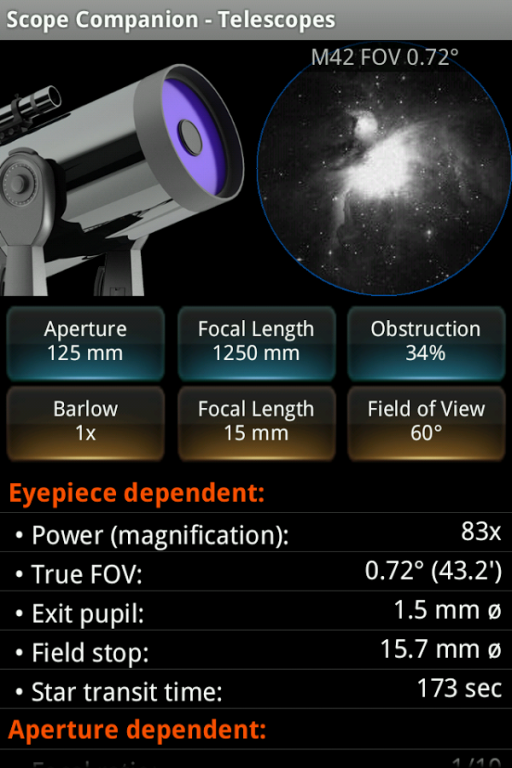
Scope Companion is software for computing performance parameters of optical equipment for astronomy, primarily designed for telescope novices and first-time buyers of optical systems.
Functions that are typically used in the dark come on red night view screens with adjustable screen brightness.
Upon input of basic specifications, such as aperture and focal length, Scope Companion calculates the ideal performance of the optics and plots a performance graph. Performance data can also be calculated for binoculars.
The imaging section calculates the field of view with a given CCD camera and lens/scope configuration. The data can be visually confirmed by means of a simulation against the surface of the moon and other objects.
Additional helper functions include a star transit counter for measuring the field of view of an unknown eyepiece, a dew point estimator, a compass, north/south polar finder, level meter, observatory clock, red light lamp, etc.
The dew point estimator supports built-in temperature/humidity sensors. The compass compensates for magnetic declination or points magnetic north.
An Observatory Clock in red night view mode with adjustable screen brightness is provided for use during observations. It shows local, universal, sidereal and martian time plus the positions of the Jovian moons!
Rise and set times are computed for the major solar system objects.
Visual aids include a red lamp and a magnifier implemented with the built-in rear camera.
Essential Features
* Telescope performance
* Binocular performance
* CCD imaging simulator
* Star transit counter
* Dew point estimator (sensor support)
* Compass
* Polar finder (north and south)
* Image orientation
* Latest Sun images (online)
* Observatory Clock
* Comet tracking
* Weather Station (online)
* Rise and set times
* Level Meter
* Red light lamp
INTERNET permission is raised for download of sun images and weather data. No data is transmitted.
GPS permission is raised as coordinates can be acquired by GPS, however, manual input is provided as well.
MEMORY permission is raised as the app can be installed to external card.
ご購入をお考えのお客様へ、
本アプリーに関するご質問は日本語でもお受けしております。
お気軽にお問い合わせください。
BEFORE YOU PURCHASE:
1. Please be so kind as to send a report preferably with screen snap should you encounter any layout issues.
2. This application requires Android 2.1 or higher and a display which is to the Android standard.
3. This application operates in Portrait mode only. Small 240x320 pixel screens NOT supported!
4. Please contact the author, if you have any pre-sales questions.
About Scope Companion
The company that develops Scope Companion is Requio Web Design. The latest version released by its developer is 1.29.
To install Scope Companion on your Android device, just click the green Continue To App button above to start the installation process. The app is listed on our website since 2016-08-03 and was downloaded 0 times. We have already checked if the download link is safe, however for your own protection we recommend that you scan the downloaded app with your antivirus. Your antivirus may detect the Scope Companion as malware as malware if the download link to requio.com_scope.companion is broken.
How to install Scope Companion on your Android device:
- Click on the Continue To App button on our website. This will redirect you to Google Play.
- Once the Scope Companion is shown in the Google Play listing of your Android device, you can start its download and installation. Tap on the Install button located below the search bar and to the right of the app icon.
- A pop-up window with the permissions required by Scope Companion will be shown. Click on Accept to continue the process.
- Scope Companion will be downloaded onto your device, displaying a progress. Once the download completes, the installation will start and you'll get a notification after the installation is finished.
Program Details
System requirements
Download information
Pricing
Version History
version 1.29
posted on 2016-08-03
Ver 1.29: Telescope parameter light gathering area corrected,Ver 1.28: Improved compatibility with various screen sizes, bug fix,Ver 1.27: Adds a planisphere each to Day and Night tools. Performance plot corrected.,Ver 1.26: Removes Audio and Magnifier Camera as raising too many unused Permissions.,Ver 1.25: Adds twilight beg/end and moon rise/set to Observatory Clock,Ver 1.24: Adds sensor support to Weather, fonts for 'Solar System Now' enlarged and twilight beg/end times added.
version 1.15
posted on 2012-12-16
Several fixes and updates
Disclaimer
External Download
We do not host Scope Companion on our servers. We did not scan it for viruses, adware, spyware or other type of malware. This app is hosted by Galad and passed their terms and conditions to be listed there. We recommend caution when installing it.
The APK Download link for Scope Companion is provided to you by apps112.com without any warranties, representations or guarantees of any kind, so access it at your own risk.
If you have questions regarding this particular app contact the publisher directly. For questions about the functionalities of apps112.com contact us.
